
Rebuild the propeller and compute off-design: the two key Heliciel functions
To build a propulsion or capture propeller (wind turbine, tidal turbine) in Heliciel, two functions are used in almost every calculation: "rebuild", which recomputes the optimum twist for the operating point, and the off-design performance calculation, which evaluates the propeller when that point changes. The first defines the blade; the second measures how it behaves away from the point it was drawn for. Both buttons are in the toolbar.
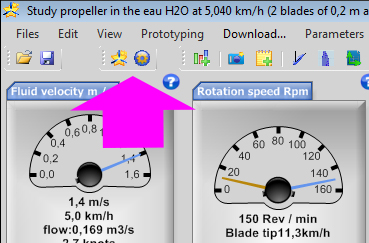
The Heliciel toolbar: the arrow points to the two buttons, rebuild and off-design calculation. Below them, the two dials that set the operating point: fluid velocity and rotation speed.
Contents:
- Rebuild the optimum blade twist

- How Heliciel builds the propeller: constant profiles or thickness law
- Compute off-design performance

- Example: the starting torque of a wind turbine
1: Rebuild the optimum twist of the propeller or wind turbine blade
When you change the geometry of your propeller, for example the blade length, the blade twist, the 3D model and the thrust and torque performance do not update by themselves. To update them from the operating point and the new geometry, you must rebuild your propeller.
Click the rebuild button
in the toolbar. When the geometry or the operating point has changed, a "Reconstruction nécessaire" (rebuild needed) badge says so in the blade geometry tab.So you impose the geometry and the operating point; Heliciel computes the twist, the angle of attack of each profile and the performance that follows.
2: How Heliciel builds the propeller: constant profiles or thickness law
Two propeller building methods are possible. They correspond to two "profile laws", which you choose in the "Blade geometry" tab, "Profiles Law" sub-tab.
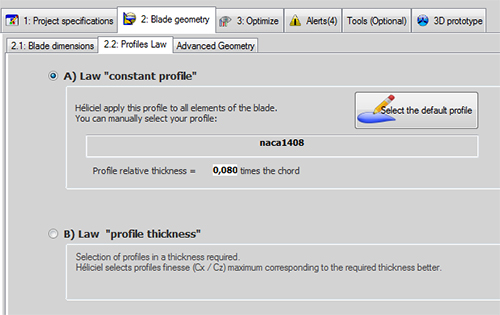
The choice of profile law in Heliciel: A) "constant profile" law, with a single profile applied to all the elements of the blade (here the NACA 1408 profile, relative thickness 0.080 times the chord); B) "profile thickness" law, where Heliciel chooses the profiles from the thickness you impose.
Method A: build a propeller with constant blade profiles. This is the default law, recommended at the start. With the constant profile law, the blade thicknesses are proportional to the widths of the blade elements. Even if the blade width varies between root and tip, the profile shape stays constant.
When you click rebuild, Heliciel looks in the database for the angle of attack that gives the best glide ratio (the Cl/Cd ratio, written Cz/Cx in French) for the constant profile you imposed along the whole blade. The Cd and Cl data are then used to solve the system of induced velocity equations. Heliciel uses the blade element and momentum method (BEM, for Blade Element Momentum) for this, with the tip loss corrections from vortex theory.
Once the induced velocities are solved, Heliciel computes the torque and thrust of each blade element, and deduces the overall result for the whole propeller. The blade twist is set so that the angles of attack take the induction into account.
Method B: build a propeller with a thickness distribution that changes the profile shapes. It is more complex, and best kept for when you master the default method. With the profile thickness law, you set the blade thickness slider independently of the blade width slider (which is the profile chord). This imposes different profile shapes along the blade: the shape at a given radius is defined by the chord width and the relative thickness imposed.
Heliciel then searches its database for the profiles that best match the widths and thicknesses requested. Since the database is not infinite, the profiles found may have thicknesses different from those you asked for. That is why the blade diagram gives two pieces of information: in yellow, the thickness requested with the sliders; in green, the thicknesses found in the database.

Requested thickness against thickness found: in this example, the relative thickness requested at the root (1.939) is brought back to 0.241 by the database. The blade diagram shows the chords in blue, the requested thicknesses in yellow and the thicknesses found in green.
To learn more, see the page on the thickness distribution along the blade.
When you click rebuild with this law, Heliciel scans the database for the profiles that match the relative thicknesses requested, and keeps those with the highest glide ratio. For each blade profile, it then selects the angle of attack of best glide ratio. It then solves the induced velocities by the blade element and momentum method, as for method A, then computes the torque and thrust on each element and their overall result. The twist takes the induction into account.
3: Compute off-design performance
The rebuild function updates the blade twist so that it matches the operating point (fluid velocity and rotation speed). Your propeller is therefore built for a given operating point.
In reality, the fluid velocity or the rotation speed may well differ from the point the propulsion or capture propeller was designed for. For example, when a wind turbine starts to turn, it is useful to know the torque at a given wind speed with an almost zero rotation speed. This tells you whether the drag of the various pieces of equipment exceeds that torque, which would prevent the propeller from starting. Another case: the propulsion propeller of a boat whose speed differs from the cruising speed the propeller was twisted for.
The twist (the "design") of the blade was studied for a given rotation speed. The off-design calculation gives the performance of the propeller after a change of the operating point, that is, a change of rotation speed or fluid velocity. Each time the operating point changes, the off-design calculation button becomes active.
You change the fluid velocity or the rotation speed, then click the off-design button: the twist stays that of the design, and Heliciel recomputes thrust, torque and efficiency for the new point. Off-design and reverse-engineering modes give less accurate estimates than the calculation at the optimum twist.
4: Example: the starting torque of a wind turbine
In this example, the rotation speed of a propeller whose twist is optimised for 800 revolutions per minute was set to zero, to simulate the wind turbine starting. One click, and the starting torque of your wind turbine is displayed.
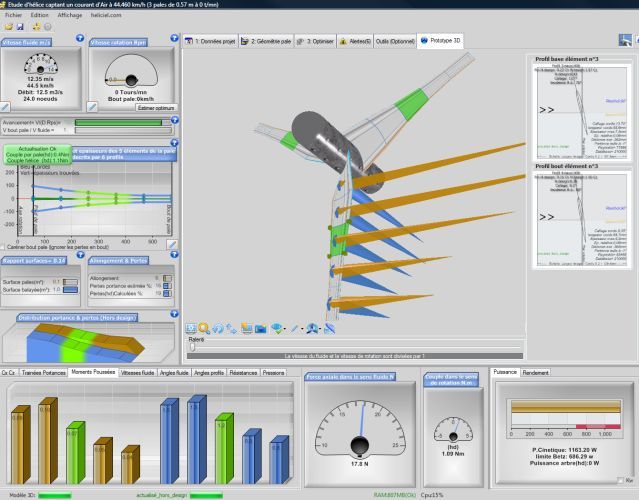
Three-blade wind turbine with 0.57 m blades, in a 12.35 m/s wind and at 0 rpm. The bottom dials give the axial force (about 17.8 N) and the torque in the direction of rotation (about 1.09 N·m); the "3D prototype" tab shows the blade and the velocities on each element.
Another calculation mode exists, to estimate the performance of an existing propeller by measuring its pitch angles at different radii. This reverse-engineering method is detailed on the page performance and modelling of an existing propeller.
To go further, we can see how the blade shape and its twist are chosen, or how pitch variation corrects the loss of performance when the operating point changes.
 Global site map
 Mecaflux
 Tutorials Mecaflux Pro3D
 Tutorials Heliciel
 Tutorials Heliciel PRO CFD
 Mecaflux Store
 Compare software functions
 Quotes, Orders, Payment Methods
 project technical studies